What is Network Topology
The physical topology of a network refers to the configuration of cables, computers, and other peripherals. Physical topology should not be confused with logical topology which is the method used to pass information between workstations. Logical topology was discussed in the Protocol chapter.Main Types of Network Topologies In networking, the term "topology" refers to the layout of connected devices on a network. This article introduces the standard topologies of computer networking.
One can think of a topology as a network's virtual shape or structure. This shape does not necessarily correspond to the actual physical layout of the devices on the network. For example, the computers on a home LAN may be arranged in a circle in a family room, but it would be highly unlikely to find an actual ring topology there.
Network topologies are categorized into the following basic types:
- Star Topology
- Ring Topology
- Bus Topology
Compared to the bus topology, a star network generally requires more cable, but a failure in any star network cable will only take down one computer's network access and not the entire LAN. (If the hub fails, however, the entire network also fails.)
See the illustration of Star Network Topology.
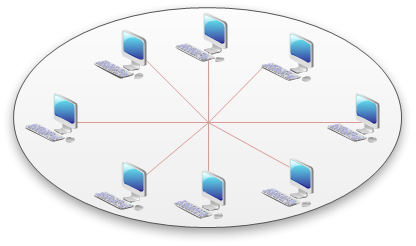
Advantages of a Star Topology
- Easy to install and wire.
- No disruptions to the network then connecting or removing devices.
- Easy to detect faults and to remove parts.
- Requires more cable length than a linear topology.
- If the hub or concentrator fails, nodes attached are disabled.
- More expensive than linear bus topologies because of the cost of the concentrators.
Star-Wired Ring
A star-wired ring topology may appear (externally) to be the same as a star topology. Internally, the MAU of a star-wired ring contains wiring that allows information to pass from one device to another in a circle or ring (See fig. 3). The Token Ring protocol uses a star-wired ring topology.
Ring Topology In a ring network, every device has exactly two neighbors for communication purposes. All messages travel through a ring in the same direction (either "clockwise" or "counterclockwise"). A failure in any cable or device breaks the loop and can take down the entire network.
To implement a ring network, one typically uses FDDI, SONET, or Token Ring technology. Ring topologies are found in some office buildings or school campuses.
See the illustration of Ring Topology.
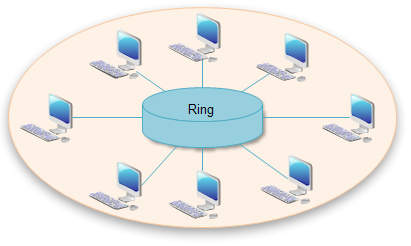
Bus Topology Bus networks (not to be confused with the system bus of a computer) use a common backbone to connect all devices. A single cable, the backbone functions as a shared communication medium that devices attach or tap into with an interface connector. A device wanting to communicate with another device on the network sends a broadcast message onto the wire that all other devices see, but only the intended recipient actually accepts and processes the message.
Ethernet bus topologies are relatively easy to install and don't require much cabling compared to the alternatives. 10Base-2 ("ThinNet") and 10Base-5 ("ThickNet") both were popular Ethernet cabling options many years ago for bus topologies. However, bus networks work best with a limited number of devices. If more than a few dozen computers are added to a network bus, performance problems will likely result. In addition, if the backbone cable fails, the entire network effectively becomes unusable.
See the illustration of Bus Network Topology.

Advantages of a Linear Bus Topology
- Easy to connect a computer or peripheral to a linear bus.
- Requires less cable length than a star topology.
- Entire network shuts down if there is a break in the main cable.
- Terminators are required at both ends of the backbone cable.
- Difficult to identify the problem if the entire network shuts down.
- Not meant to be used as a stand-alone solution in a large building.
Considerations When Choosing a Topology
- Money. A linear bus network may be the least expensive way to install a network; you do not have to purchase concentrators.
- Length of cable needed. The linear bus network uses shorter lengths of cable.
- Future growth. With a star topology, expanding a network is easily done by adding another concentrator.
- Cable type. The most common cable in schools is unshielded twisted pair, which is most often used with star topologies.
